
Claude, ChatGPT, Grok, and more down again? What to do when your favorite AI assistants stop responding
We’ve all been there. You’re on a tight deadline, ready to map out a content strategy, debug a critical script, or polish a client proposal. You open your AI assistant, paste your perfectly crafted prompt, and… nothing.
You’re left staring at a blank screen, a dreaded Error 529, or a bright red banner announcing that “servers are at capacity.”
As generative AI platforms like OpenAI’s ChatGPT, Anthropic’s Claude, Google Gemini, and xAI’s Grok embed themselves deeper into our daily creative workflows, these cloud-hosted services are heavily straining under the sheer volume of global demand.
The May 2026 Disruption Snapshot
According to real-time platform stability data tracked on Status Is Down, hosted AI tools have tended to experience more frequent outages over the last few months, turning temporary disruptions into a regular operational occurrence.
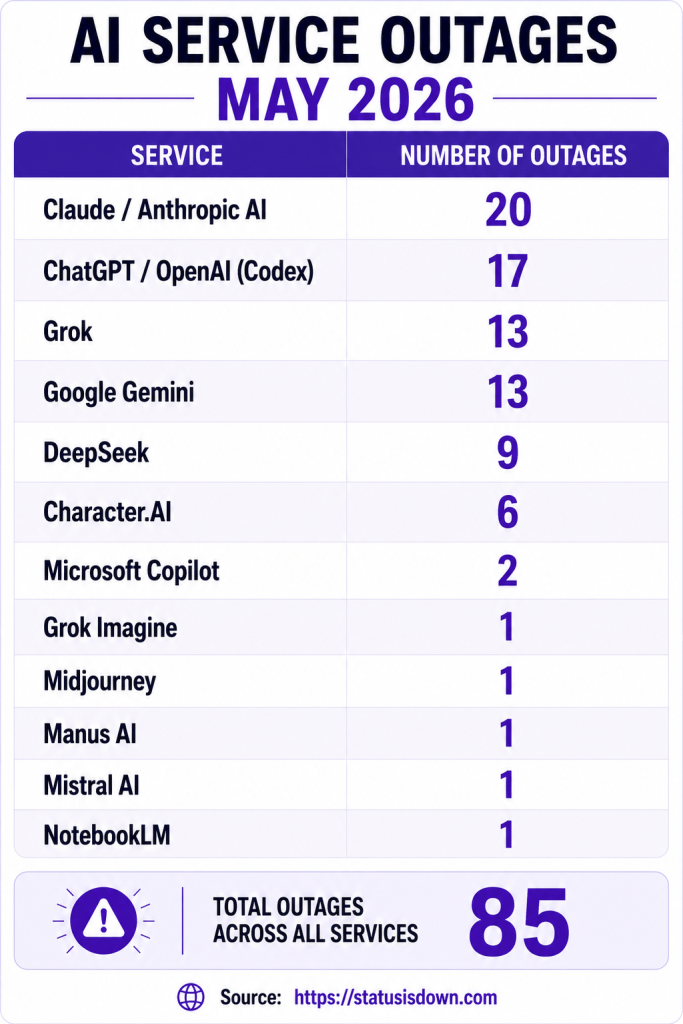
Here is exactly how the top AI platforms performed over a 31-day tracking window in May 2026:
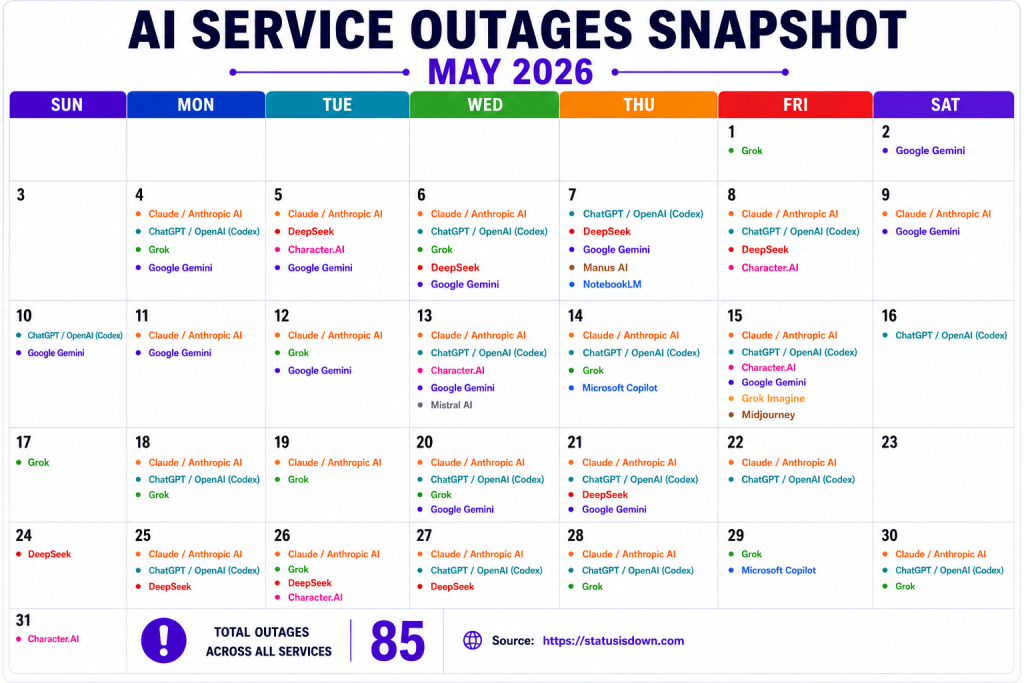
The real question is—how do you keep your productivity from grinding to a halt when your digital assistant takes an unannounced coffee break?
Your AI Outage Survival Guide
1. Check for a Partial vs. Total Outage
Not all outages are complete system failures. Sometimes your AI just needs a nap—you just need to check if one eye is still open. Many platforms experience partial downtime where the primary web interface collapses, but alternative endpoints remain perfectly functional. If the desktop web app stalls, immediately check the mobile version or try testing the API backend directly through a clean playground interface like Google AI Studio or the Anthropic Console.
2. Deploy Multi‑Model Redundancy
Never rely entirely on a single ecosystem. Treat your AI workflow like modern dating—don’t commit to just one. Keep active backup accounts bookmarked across distinct architectures so you can copy-paste your context thread and keep moving without missing a beat:
- For coding tasks: If your primary assistant fails, pivot immediately to purpose-built coding environments like Cursor, GitHub Copilot, or Windsurf.
- For creative copy & strategy: Swivel between OpenAI, Anthropic, and Google Gemini to distribute your reliance.
3. Run Local, Offline Models
For true outage‑proof resilience, stop depending entirely on the cloud. Think of this step as AI camping—it’s rugged, offline, and surprisingly refreshing. Modern consumer laptops are now powerful enough to run highly capable open-source models completely locally. Free tools like Ollama or LM Studio let you download and run models like Llama 3 or Mistral directly on your machine. They require zero internet connection, have absolute capacity limits of zero, and keep your data entirely under your control.
4. Sandbox Before You Click
Major platform outages always attract digital opportunists. If your AI is down, don’t let malware become your desperate rebound. Security researchers frequently warn of clever malvertising traps where bad actors deploy fake “service down” status pages pushing malicious desktop downloads. Always stick to official system URLs and verified community status logs before installing any new diagnostic tool or desktop client.
5. Batch Your Prompts for Later
Don’t waste valuable time repeatedly hitting refresh on a broken chat box. Treat your frozen AI like an old office printer—queue up your jobs, and then hit “Run” once the paper jam clears. Keep a local Markdown file or Google Doc open to continuously draft and organize your prompts. The moment the servers breathe back to life, you can feed them into the system in bulk.
6. Revert to Pre‑AI Classics
When the modern stack fails, it’s time to dust off the reliable machinery that built the web. Switch back to your core productivity spaces like Evernote, Trello, Notion, or an analogue notepad. Remember when brainstorming used to involve colorful physical sticky notes instead of relying on complex digital automation? It still works.
7. Optimize Around Peak Traffic Slots
Server disruptions heavily correlate with global office hours. Treat your AI workspace like a popular local gym—avoid peak rush hour unless you enjoy waiting in a digital queue. If you have data-heavy tasks or massive prompt workflows to run, try scheduling them for early morning or later in the evening to bypass the mid-day traffic walls.
8. Activate Human Brain Mode
Yes, you still possess a highly functional organic brain—it’s not just a localized GPU with legs. Use the unexpected digital quiet to lean on your colleagues, jump into forum discussions, or untangle complex creative problems using raw, uninterrupted human ingenuity.
9. Keep a Crisis Playlist Ready
If your digital assistant is taking a forced coffee break, maybe you should take one too. Use the infrastructure downtime as a built-in mental circuit breaker. Step away from the monitor, put on a favorite track, stretch, and step outside for five minutes to completely reset your cognitive load.
The Takeaway
At the end of the day, you should treat generative AI like an energetic intern—they are incredibly helpful to have around, but you should never give them the only copy of the keys to your project. By saving your prompts locally, diversifying your model ecosystems, and knowing how to pivot offline, you ensure that a remote server crash will never hold your creative output hostage.
Sometimes, the ultimate productivity hack is simply knowing when to go old-school.
How do you handle it when your AI workflow breaks down? Do you keep local open-source models ready to go on your desktop, or do you take it as a universal sign to close the laptop and grab a coffee?
Source: https://community.designtaxi.com/forum/65-status-is-down-outages-downtime/
Image: Yalcinsonat | Dreamstime.com