New: Status Is UP for iPhone and Android
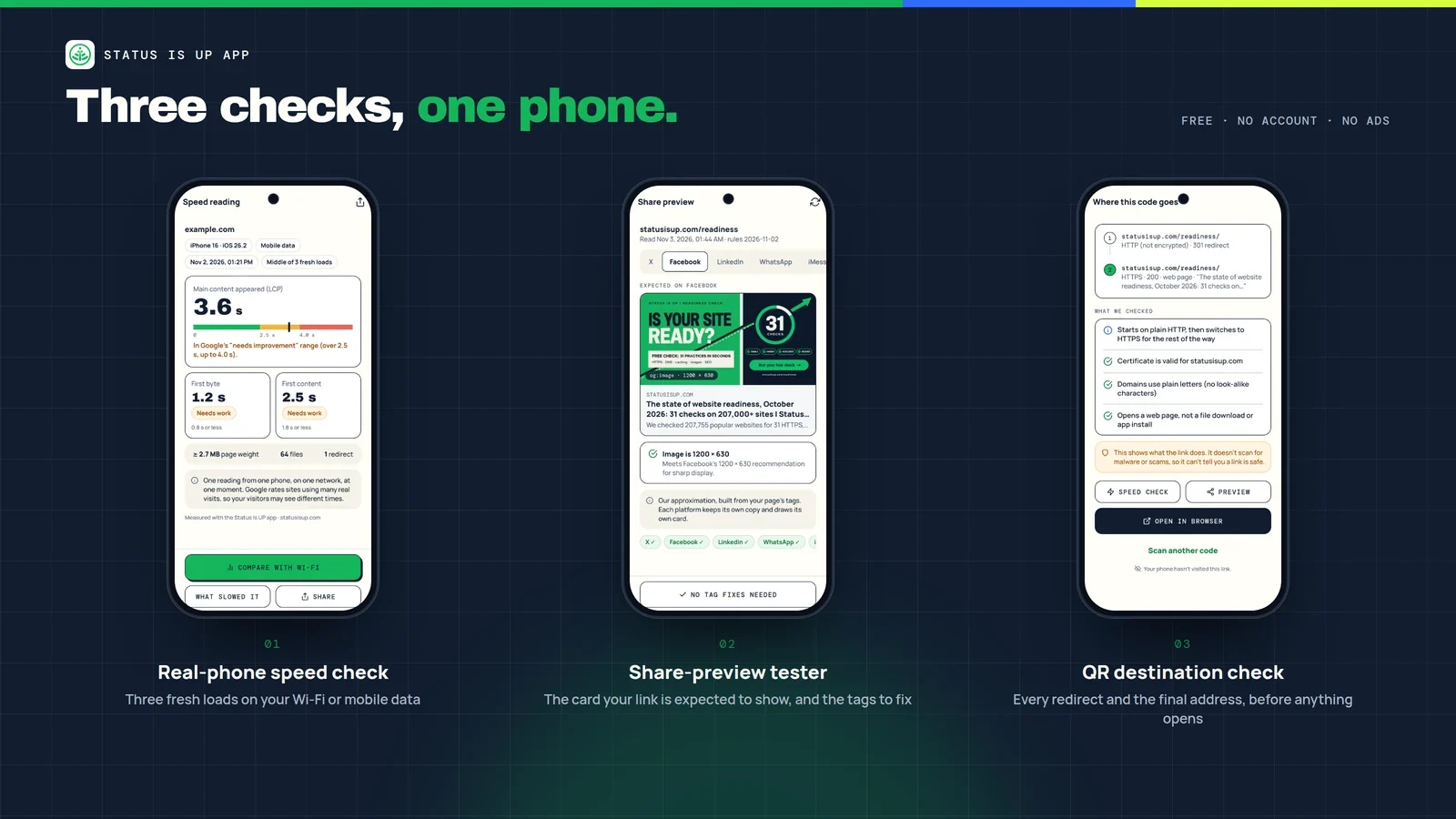
Status Is UP, the sister platform of Status Is Down, is now on iPhone and Android. The free Status Is UP app gives website owners three quick checks they can run from their own phone: how fast a page loads on that phone, what a link card should look like when the page is shared, and where a QR code really goes before anyone opens it.
Status Is Down tells you when a service or website is down. Status Is UP helps you get your own site ready before visitors arrive. The app brings that second job to the device most of your visitors already use.


Why test on a phone?
Most speed and preview tools run on a fast server in a data centre. Your visitors don’t. They open your page on a phone, often on mobile data, and they meet your link first as a card in a chat or a social feed. A growing number arrive by scanning a QR code on a poster, a menu or a package. The Status Is UP app checks each of those moments where they actually happen.
1. Speed on this phone
Enter an address and the app loads the page three times from a clean start, then shows the middle run. You see three timings:
- First byte, how long the server took to start answering (Time to First Byte).
- First content, when anything first appeared on screen (First Contentful Paint).
- Main content, when the largest part of the page appeared (Largest Contentful Paint), where the phone reports it.
Each timing is rated against the thresholds Google publishes for Core Web Vitals and related metrics:
| Timing | Good | Needs improvement | Poor |
|---|---|---|---|
| Main content (LCP) | 2.5 s or less | Over 2.5 s, up to 4.0 s | Over 4.0 s |
| First content (FCP) | 1.8 s or less | Over 1.8 s, up to 3.0 s | Over 3.0 s |
| First byte (TTFB) | 0.8 s or less | Over 0.8 s, up to 1.8 s | Over 1.8 s |
Run the check on Wi-Fi, then again on mobile data, and the app puts the two readings side by side. “What slowed this load” lists the heaviest files and redirects from that run, next to a quick server-side view from statusisup.com, so you can tell a slow server from a heavy page.

Each reading is one dated measurement on one phone, on one network, at one moment. It isn’t a verdict for every visitor. Google rates sites using many real visits from the Chrome UX Report, which you can look up in PageSpeed Insights. For ways to bring the numbers down, see the Status Is UP guide to website performance optimization.
2. Share preview
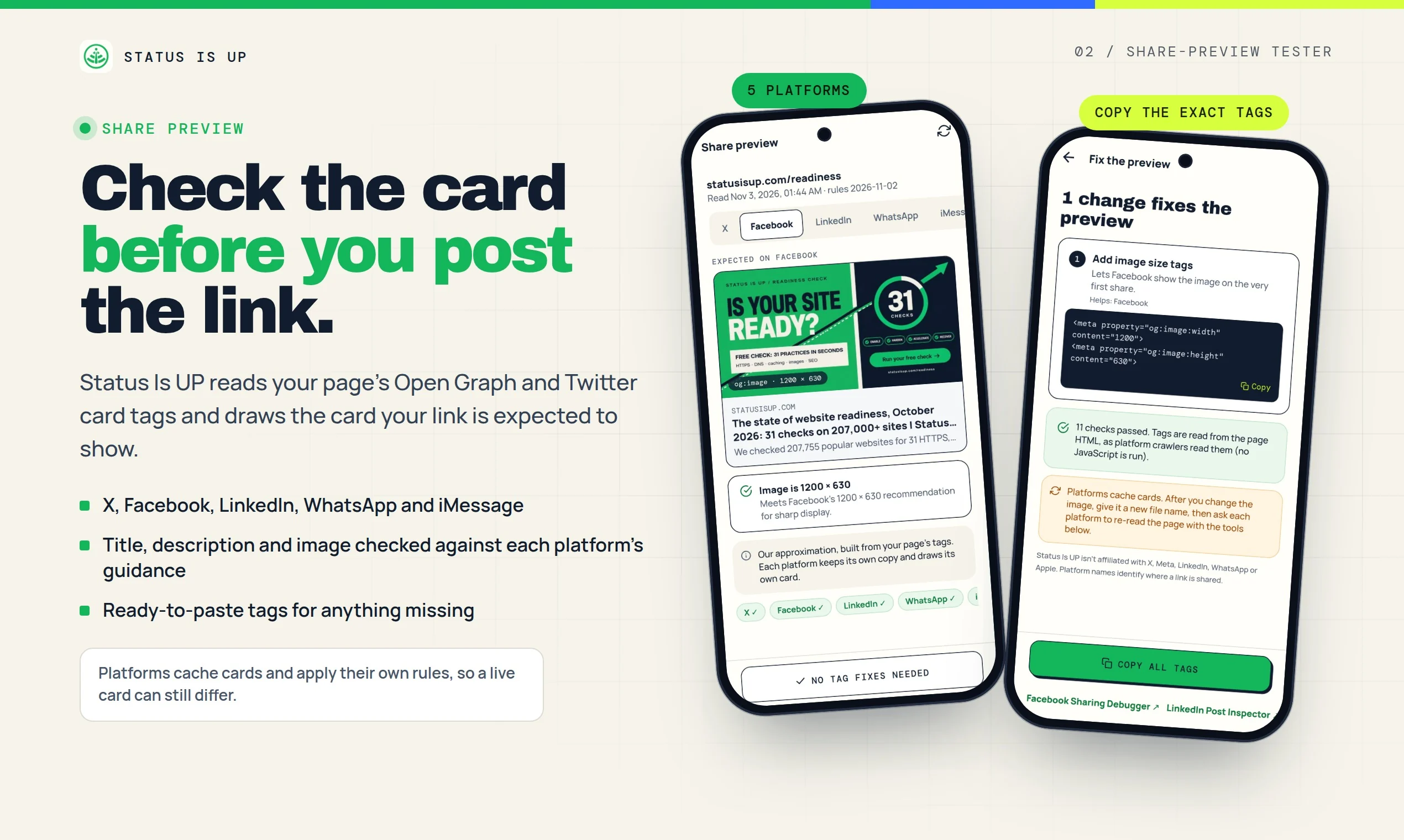
Check a link before you post it. The app reads your page’s Open Graph and Twitter card tags and draws the card your link is expected to show on X, Facebook, LinkedIn, WhatsApp and iMessage. It checks the title, description and image against each platform’s published guidance, such as Facebook’s recommended 1200 × 630 image.
If something is missing or the wrong size, the app gives you ready-to-paste tags to fix it, and links to the platforms’ own re-check tools, such as the LinkedIn Post Inspector. Platforms keep their own copy of a card and apply their own rules, so a live card can still differ from the preview.
3. QR destination
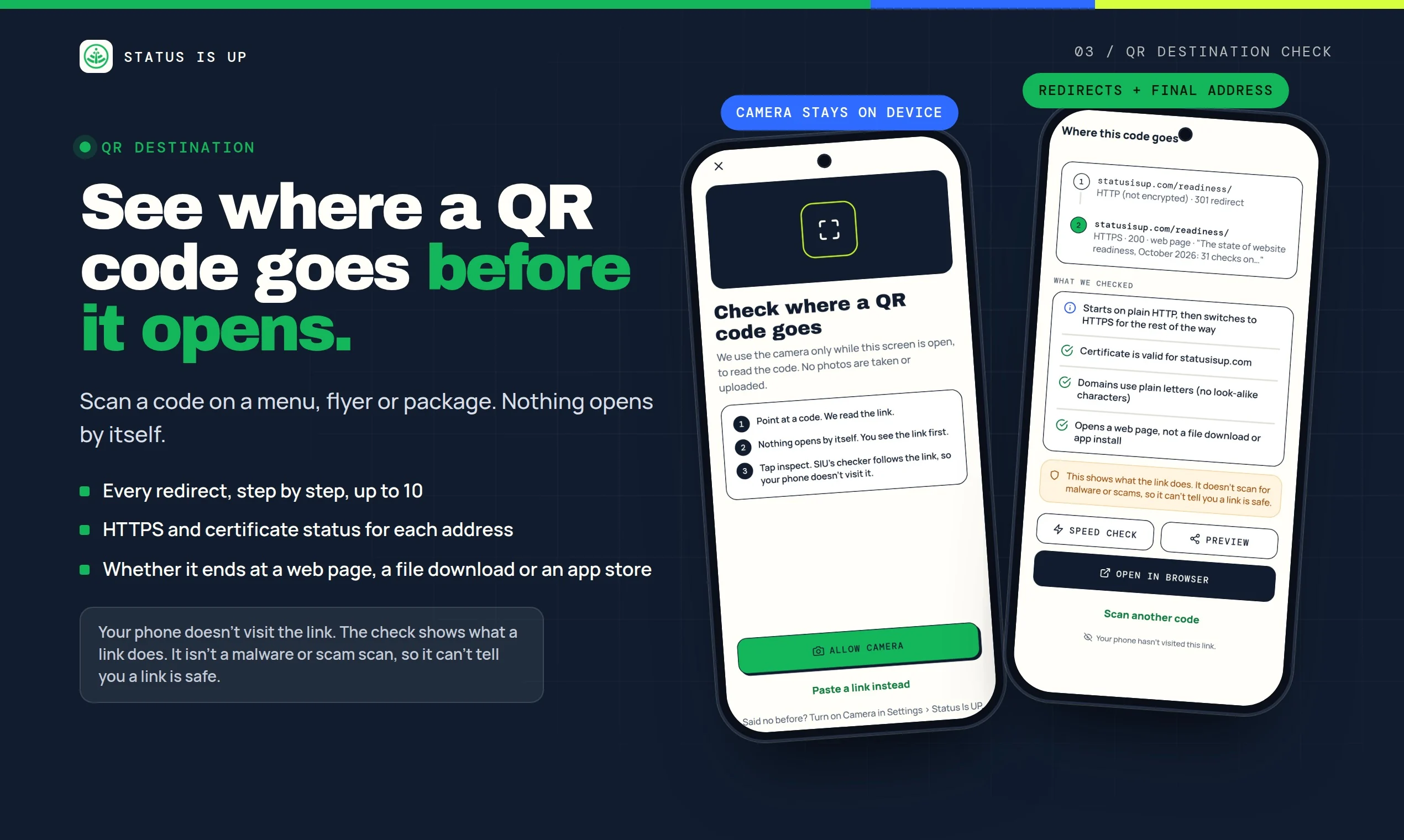
Scan a QR code on a menu, flyer or package and see where it goes before you open it. Nothing opens by itself. When you tap Inspect, the Status Is UP server follows the link step by step, up to 10 redirects, and reports:
- Every address along the way.
- Whether each step uses HTTPS, and whether the certificate is valid.
- Whether the domain uses plain letters, without look-alike characters.
- What the last step returns: a web page, a file download or an app store page.
Your phone doesn’t visit the link, and the camera image never leaves your phone. The check shows what a link does. It doesn’t scan for malware or scams, so it can’t tell you a link is safe. For businesses that print QR codes, it’s a quick way to confirm that a code on a new poster still lands on the right page over HTTPS.
Private by design
- No account, no ads and no tracking.
- Results and history stay on your phone. QR scans are kept only if you turn that on.
- One tap clears all history.
- Addresses for share previews, QR checks and the server view go to statusisup.com only to run that check, and aren’t stored. Speed tests run on your phone.
The Status Is UP privacy notice explains exactly what the app sends and why.
Status Is Down and Status Is UP, side by side
The two apps do different jobs. The Status Is Down app answers “is it down, or just me?” for 14,300+ services and 2M+ websites, and alerts you when the ones you follow go down or recover. The Status Is UP app is for the sites you run: it helps you check speed, link previews and QR codes before your visitors find a problem. Use Status Is Down to see today’s live outages, and Status Is UP to check your own site’s readiness.
Get started in a minute
- Download Status Is UP from the App Store or get it on Google Play. You can also scan the code on statusisup.com/app.
- Enter your home page and run a speed check on Wi-Fi, then again on mobile data.
- Run a share preview on the page you’re about to post, and paste in any missing tags.
- Scan the QR code on your own printed material and confirm it lands on the right page.
- For the bigger picture, run the free 31-practice readiness check on statusisup.com.
Frequently asked questions
Is the Status Is UP app free?
Yes. It’s free to download and use, with no ads and no in-app purchases.
Which phones are supported?
iPhone with iOS 16.4 or later, and Android phones with Android 7.0 or later.
Do I need an account?
No. The app works without an account, and your results stay on your phone.
Is the speed reading my site’s Core Web Vitals score?
No. It’s one reading from your phone and network. Google’s Core Web Vitals assessment uses real visits from many Chrome users, which you can check in PageSpeed Insights.
Can the app tell me whether a QR code is safe?
No. It shows where a code goes and how it gets there, including HTTPS, certificates and the final page type. It doesn’t scan for malware or scams.
Test your site where your visitors are
Download Status Is UP for iPhone or for Android, and see your site the way your visitors do. For practical guides on speed, SEO and launch readiness, explore the Status Is UP wiki.
For more platform announcements and tools, explore New on SID.
Apple, iPhone and the Apple logo are trademarks of Apple Inc., registered in the U.S. and other countries. App Store is a service mark of Apple Inc. Google Play and the Google Play logo are trademarks of Google LLC. Status Is UP isn’t affiliated with X, Meta, LinkedIn or WhatsApp; platform names only identify where a link is shared.
Images: Status Is UP